共计 4430 个字符,预计需要花费 12 分钟才能阅读完成。
NextCloud 性能优化
后台任务
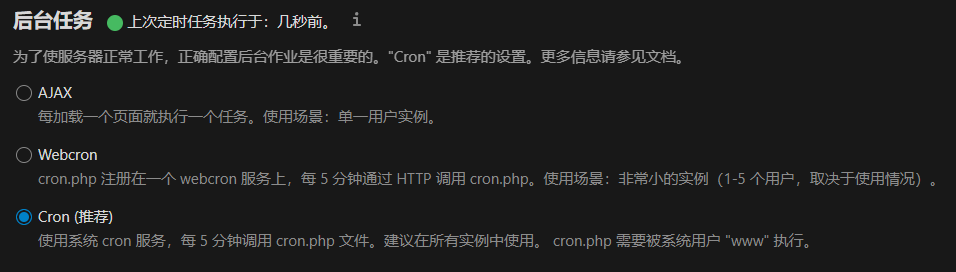
crontab -u www -e
*/5 * * * * php -f /PathToNextcloud/cron.php
设置 cron.php 每 5 分钟运行一次,cron.php的具体路径在 nextcloud 安装的根目录下。
cron.php应该被 www 用户执行。
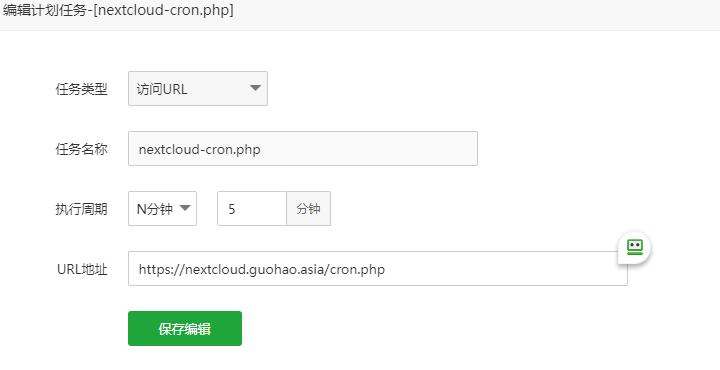
另外,宝塔面板用户也可以通过面板上的“计划任务”来执行cron.php, 如:
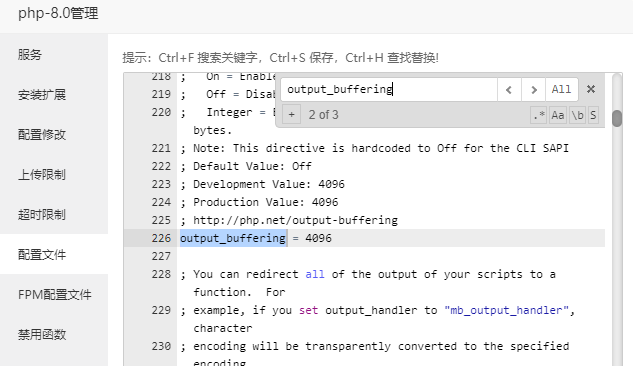
PHP configuration option output_buffering must be disabled
注释掉 php.ini 中的; output_buffering = 4096
缓存配置
在 /config/config.php 中添加如下代码:
  'memcache.local' => 'OC\\Memcache\\APCu',        #Memcached

  'memcache.distributed' => 'OC\\Memcache\\Memcached',

  'redis' => [        #Redis

      'host' => 'localhost', #Redis 服务器

      'port' => 6379,     #Redis 端口

      'timeout' => 0.0,       #Redis 超时设定

      'password' => '########',       #Redis 密码

      'dbindex' => 1,     #Redis 数据库选择

  ],

  'memcached_servers' => array(        #Memcached 服务器

      array('localhost', 11211),

  ),

  'memcached_options' => array(        #Memcached 选项

      \Memcached::OPT_CONNECT_TIMEOUT => 50,

      \Memcached::OPT_RETRY_TIMEOUT =>   50,

      \Memcached::OPT_SEND_TIMEOUT =>    50,

      \Memcached::OPT_RECV_TIMEOUT =>    50,

      \Memcached::OPT_POLL_TIMEOUT =>    50,

      \Memcached::OPT_COMPRESSION =>          true,

      \Memcached::OPT_LIBKETAMA_COMPATIBLE => true,

      \Memcached::OPT_BINARY_PROTOCOL =>      true,

  ),

  'cache_path' => '/www/wwwroot/nextcloud/cache',        #缓存目录

  'cache_chunk_gc_ttl' => 60*60*24,        #缓存删除时间
代码中有些内容需要根据具体情况进行修改替换。建议添加在最后,Nextcloud 搭配了 COS 之类的,建议放在 COS 配置之前。
PHP 的 OPcache 模块未载入。推荐开启获得更好的性能。PHP OPcache 模块没有正确配置。
安装 OPcache,在php.ini 中加入如下内容:
opcache.enable=1
opcache.enable_cli=1
opcache.interned_strings_buffer=32
opcache.max_accelerated_files=80000
opcache.memory_consumption=128
opcache.save_comments=1
opcache.revalidate_freq=3
特别注意的是,如果使用宝塔面板,最好在最后一行结束后用回车换行,否则宝塔还会接着最后一行的最后一个字符添加其他内容。
“Strict-Transport-Security” HTTP 头未设为至少 “15552000” 秒。为了提高安全性,建议启用 HSTS
在 apache 的配置文件中加入:
<IfModule mod_headers.c>
      Header always set Strict-Transport-Security "max-age=15552000; includeSubDomains"
</IfModule>
一些文件未通过完整性检查。有关如何解决这一问题的进一步信息可在 文档中找到。(无效文件列表… / 重新扫描…)
点开无效文件列表:
Technical information
=====================
The following list covers which files have failed the integrity check. Please read
the previous linked documentation to learn more about the errors and how to fix
them.

Results
=======
- core
 - FILE_MISSING
  - .user.ini
 - EXTRA_FILE
  - .well-known/acme-challenge/dNIrvBYgSweGs1H0NW2rAMZOp0xKOKJgOdeqzJdJt9g

Raw output
==========
Array
([core] => Array
        ([FILE_MISSING] => Array
                ([.user.ini] => Array
                        ([expected] => 4843b3217e91f8536cb9b52700efb20300290292cf6286f92794d4cec99df286afeb7dd6c91b1be20bc55eda541eef230a5c5e7dcd46c189edd0ed1e80c6d3f5
                            [current] =>
                        )

                )

            [EXTRA_FILE] => Array
                ([.well-known/acme-challenge/dNIrvBYgSweGs1H0NW2rAMZOp0xKOKJgOdeqzJdJt9g] => Array
                        ([expected] =>
                            [current] => c5ba196825088a37caca22449c2548cf59df02f166fdfc973652b6ce886f84259f2ce6349860a9a8874648207ff37f372ff87a4f08153737dcc5d3deaa61672e
                        )

                )

        )

)
可以看到是 .user.ini 文件不存在,好在这个文件是用来放跨站的配置文件,在宝塔面板里直接开启放跨站就好,或者创建文件后写入 open_basedir=/PathToNextcloud/:/tmp/,其中/PathToNextcloud/ 是 Nextcloud 的安装目录;
而另外一个文件是多余的,直接删掉(这个文件是申请 SSL 证书时自动生成的)。
完整 config.php 设置
<?php
$CONFIG = array (
  'instanceid' => 'xxxxxxxxxxx',
  'passwordsalt' => 'xxxxxxxxxxxxxxxxxx',
  'secret' => 'TNFR/+xxxxxxxxxxxxxxxxxxx/',
  'trusted_domains' =>
  array (0 => 'nextcloud.guohao.asia',),
  'datadirectory' => '/www/wwwroot/nextcloud/data',
  'dbtype' => 'mysql',
  'version' => '24.0.5.1',
  'overwrite.cli.url' => 'https://nextcloud.guohao.asia',
  'dbname' => 'xxxxxxxxxxxx',
  'dbhost' => 'localhost',
  'dbport' => '','dbtableprefix'=>'oc_','mysql.utf8mb4'=> true,'dbuser'=>'xxxxxxxxxx','dbpassword'=>'xxxxxxxxx','installed'=> true,'app_install_overwrite' =>
  array (
    0 => 'tencentcloudcosconfig',
    1 => 'files_external_onedrive',
  ),

#缓存设置
  'memcache.local' => 'OC\\Memcache\\Redis',
  'memcache.distributed' => 'OC\\Memcache\\Memcached',
  'redis' => [        #Redis
      'host' => 'localhost', #Redis 服务器
      'port' => 6379,     #Redis 端口
      'timeout' => 0.0,       #Redis 超时设定
      'password' => 'XXXXXXXXXXX',        #Redis 密码
      'dbindex' => 1,     #Redis 数据库选择
  ],
  'memcached_servers' => array(        #Memcached 服务器
      array('localhost', 11211),
  ),
  'memcached_options' => array(        #Memcached 选项
      \Memcached::OPT_CONNECT_TIMEOUT => 50,
      \Memcached::OPT_RETRY_TIMEOUT =>   50,
      \Memcached::OPT_SEND_TIMEOUT =>    50,
      \Memcached::OPT_RECV_TIMEOUT =>    50,
      \Memcached::OPT_POLL_TIMEOUT =>    50,
      \Memcached::OPT_COMPRESSION =>          true,
      \Memcached::OPT_LIBKETAMA_COMPATIBLE => true,
      \Memcached::OPT_BINARY_PROTOCOL =>      true,
  ),

  'cache_path' => '/www/wwwroot/nextcloud/cache',        #缓存目录
  'cache_chunk_gc_ttl' => 60*60*24,        #缓存删除时间

#腾讯云 COS
  'objectstore' =>
  array (
    'class' => '\\OC\\Files\\ObjectStore\\S3',
    'arguments' =>
    array (
      'key' => 'XXXXXXXXXXXXXXXXXXXXXXXX',
      'secret' => 'XXXXXXXXXXXXXXXXXXXXXXXX',
      'bucket' => 'nextcloud-000000000',
      'hostname' => 'cos.ap-beijing.myqcloud.com',
      'use_ssl' => true,
      'autocreate' => false,
    ),
  ),

  #电话区号
  'default_phone_region' => 'CN',
);
解决 nextcloud 无法更新应用
在 ==config.php== 中添加如下内容:
 'appstoreenabled' => true,
 'appstoreurl' => 'https://www.orcy.net/ncapps/v1/',
更换为国内源(更新进度较官方略慢)
由“维护模式”改出
在 nextcloud 根目录下执行sudo -u www php occ maintenance:mode --off
了解 一个 HR 的更多信息
订阅后即可通过电子邮件收到最新文章。